How Contractors Should Choose CAD Software
A job-first checklist for contractors choosing CAD: view-only vs edit-on-site vs full-time drafting, with DWG, installs, training, and cost criteria.

The best CAD for a contractor firm is the one that matches who touches the drawing and what they must do with it. Brand familiarity is secondary.
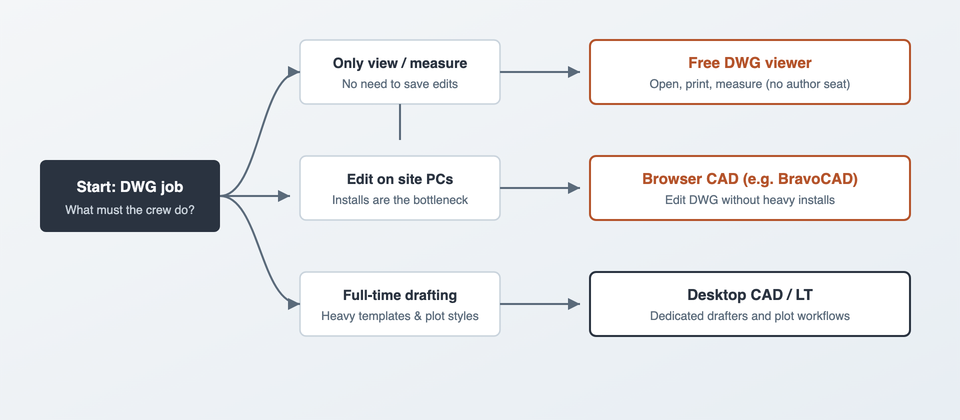
The three jobs (buy for these, not for logos)
- View and measure: open consultant DWG, check dimensions, print PDF. No save required.
- Edit on ordinary PCs: revise plans on site laptops and locked office machines without a heavy install.
- Full-time drafting: templates, plotting, Xrefs, all-day production by dedicated drafters.
Most firms need more than one path. Mixing a free viewer + browser CAD such as BravoCAD + a few desktop seats is often cheaper and calmer than “AutoCAD for everyone.”
Checklist before you buy
File reality
- Which DWG years do consultants send you?
- Do you must save DWG back, or is PDF markup enough?
- Are civil / sewer / trench drawings your daily bread, or occasional?
Machine reality
- How many site laptops cannot run a heavy desktop CAD install?
- Who has admin rights to install software?
- Is offline work mandatory, or is site internet reliable enough?
People reality
- Who are full-time drafters vs occasional editors vs readers only?
- How many hours of training can the crew actually take?
- Will temporary staff need access next month?
Money reality
- What is the cost per author seat vs per viewer?
- Are you paying for features nobody uses?
- See AutoCAD pricing for how subscription math grows with headcount.
Practical stacks that work
Small contractor, mostly reading plans
Free DWG viewer for PMs and site leads. One desktop CAD seat (or LT) for the person who prepares sketches. Optional browser CAD such as BravoCAD when as-built edits start arriving from site.
Civil / sewer crew editing in the field
Browser CAD (BravoCAD) for shared DWG edits on ordinary machines, plus a free viewer for people who only measure. Desktop seats stay with office drafting if you have it.

Drafting-heavy office
Desktop CAD / AutoCAD LT for production. Viewers for everyone else. Do not force author licenses onto staff who never save a file.
What to read next
- AutoCAD LT alternatives for contractors
- Free DWG viewers
- Benefits of browser-based CAD
- Open a DWG without AutoCAD
Bottom line
Choose CAD by the job: viewers for readers, browser CAD such as BravoCAD when installs block edits, desktop CAD where drafting hours pile up. That split is how contractors keep DWG moving without overbuying seats.